Law Firm Practice Area Page Guide: How to Optimize Every Practice Area Page on Your Website

Want to see more TypeTopia Agency research in Google?
Add TypeTopia Agency as a preferred source to tell Google you’d like to see more of our law firm marketing research and guides.
You should optimize your law firm practice area page for your qualified lead first, while making it clear to the search engine or AI tool they may use to find your firm. Fortunately, you do not need separate strategies. One will do, and it all centers around one thing: clarity. This guide will help you understand how to optimize your law firm practice area page.
Key Points for Law Firm Owners
- Build each practice area page around one clear client need. Do not create separate pages for every keyword variation if the underlying legal service is the same.
- Use a clear hierarchy. Your broad pillar page should connect to specific practice area pages, and those pages should link back where the relationship helps the prospective client understand your services.
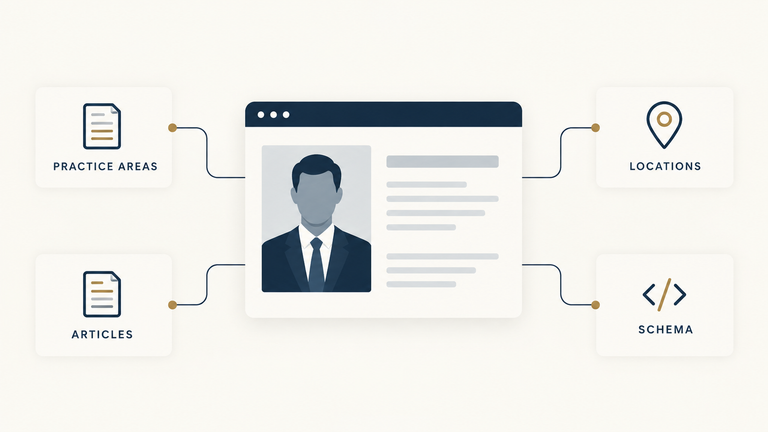
- Give each page enough legal substance to answer the questions someone with that problem is likely to have. Then show who actually handles the matter by connecting the page to the relevant attorneys.
- Add proof that supports the specific service, such as relevant case results, testimonials, Google reviews, or awards.
- Optimize the SEO title, H1, URL, opening copy, and headings around the primary intent of the page. Use schema to describe the page and legal service accurately.
- Make geographic relevance clear where it matters. You can use location modifiers within the page or create a dedicated location practice area page when there is enough distinct local intent to justify one.
- Measure more than rankings and traffic. A successful practice area page should help generate qualified calls, contact form submissions, or other inquiries from people who actually need the service.
What Is a Law Firm Practice Area Page and Why Do You Need It?
A practice area page is a dedicated page on your law firm website that bridges the gap between the legal services you provide and the problems a prospective client needs a lawyer to solve.When built correctly, a practice area page can be one of the most conversion-focused parts of your website. As you will see, it also works with other parts of your site to move qualified leads from the top of the funnel toward conversion at the bottom.
In our analysis of law firm SEO ranking factors, two of the three firms we studied ranked in Google with dedicated practice area pages, while the third ranked with a homepage that functioned much like a business law landing page. In our broader analysis of AI visibility for law firms, practice and service pages were even more predominant: they accounted for 18 of the 20 distinct firm-owned URLs cited by AI tools and 84% of all firm-owned citation records.Think of it this way:
Someone could use many different doors to enter your law firm’s website. They may have been informed and educated by a blog, then moved from that blog to your home page, which is like the lobby with access to the other areas of your site. When they land on a specific practice area page, they should immediately be able to tell whether you can solve their problem. They should also be able to validate that through the attorney pages of the lawyers who actually handle that type of matter.
What Are the Different Types of Practice Area Pages?
On your law firm website, you can have four different types of practice area pages:
- Pillar practice area pages
- Specific practice area pages
- Sub-practice pages
Let’s look at each of them in more detail.
Pillar Practice Area Pages
A pillar practice area page is the main page for a broad legal service that your law firm provides. Its purpose is to help a prospective client understand your overall practice and direct someone with a more specific problem to the relevant child practice area page.
For instance, the pillar structure for two different law firms could look like this:
Business Litigation ← pillar practice area page
- Shareholder Disputes
- Partnership Disputes
- Breach of Contract
- Restrictive Covenant Disputes
Personal Injury ← pillar practice area page
- Car Accidents
- Truck Accidents
- Motorcycle Accidents
- Slip and Fall
Or:
Family Law ← pillar practice area page
- Divorce
- Child Custody
- Child Support
How to Optimize Your Pillar Practice Area Pages
Target the Broad Practice
Make the Child Service Pages Visible and Useful
The second job of the pillar page is to introduce your child pages and help someone with a specific problem see that you offer a relevant solution. You could use cards with internal links to the child pages. You could also use prose under H3s, with internal links leading to each relevant sub-page.
Just don’t overdo it. Avoid turning the main practice area page into a directory of child pages. It should still have enough substance for prospective clients to understand your practice and for search engines and AI tools to evaluate the page.
Deliberately Link Upward and Downward
Your pillar practice area page should link down to the relevant child pages, and those child pages should link back into the broader practice where it helps the prospective client understand how the services relate.
We saw this pattern in our AI visibility analysis of 13 law firms that appeared across all five AI platforms. The AI-cited practice area pages usually sat inside clear topical structures, with broad practices connected to narrower legal problems. We also found that the relevance of those internal links was more consistent than the number of links pointing to a page
Connect the Pillar Page to the Attorneys Who Handle the Practice
Someone reading is eventually going to ask themselves, “Okay, but who is actually going to handle my matter?” Your pillar page should make that clear using actual attorney bio pages showing the attorneys who handle the matters on the page.
How you display the attorneys can depend on the size of the practice. A smaller firm can incorporate the relevant attorneys directly into the page or sidebar. A larger practice can use a dedicated Practice Team module or tab, as long as the attorneys remain clearly connected to the practice and their profiles are easy to reach.
Optimize the On-Page SEO Elements of Your Pillar Practice Area Page
Then cover these in a very practical order:
- SEO title: Lead with the broad practice keyword and make the search intent clear.
- H1: Use the main practice area naturally, such as “New Jersey Business Litigation Lawyers” or “Family Law Attorneys.”
- URL: Keep it short and descriptive, such as
/business-litigation/. - Opening copy: Confirm the practice, who you help, and the type of matters you handle without stuffing keywords.
- H2s and H3s: Use headings to organize the child practice areas and the questions prospective clients actually have.
- Internal anchor text: Use descriptive anchors when linking to child pages rather than vague phrases like “learn more.”
- Meta description: Explain what the practice covers and give the right prospective client a reason to click.
- Images and alt text: Use relevant images where they add value, with descriptive alt text rather than keyword stuffing.
Include a Conversion Call to Action Within the Pillar Page
Someone could very well land on the pillar practice area page, recognize that your firm handles their matter, and want to take the next step. You need to make it easy for them to do so.
Have a phone number or other contact information somewhere visible on the page, whether in the header or sidebar. You could also embed a contact form within the text, at the end of the page, or in the sidebar.
Use CollectionPage Schema for a Pillar Practice Area Hub
A pillar practice area page can do two jobs at once. It can be the main page for a broad legal service while also linking to the more specific practice pages beneath it.
In that case, CollectionPage can describe the page itself, while Service describes the legal service the page represents.
For example:
Business Litigation page@type: CollectionPage
Main entity
Business Litigation@type: Service
Provider
Your law firm@type: LegalService
You can then use hasPart to connect the pillar page to child pages such as Contract Disputes or Shareholder Disputes. Those child pages can use isPartOf to point back to the Business Litigation pillar.
If the page visibly lists the services within the practice, you can also use ItemList for that section.
Do not use CollectionPage simply because the page contains a few links to related services. It makes the most sense when the pillar genuinely acts as the central hub for the broader practice.
For more information on how to structure these relationships across your website, read our guide to schema markup for law firms.
Submit the Pillar Practice Area Page for Indexing
Once your practice area page is live, submit the URL for indexing through Google Search Console. Use the URL Inspection tool, enter the page URL, and request indexing.
Then be patient. Requesting indexing tells Google that the page is available to crawl, but it does not mean Google will index it immediately.
Check the page again in Search Console after Google has had time to process it. You may see one of several responses:
- Indexed: Google has crawled the page and added it to its index.
- Discovered, currently not indexed: Google knows the page exists but has not crawled it yet.
- Crawled, currently not indexed: Google crawled the page but decided not to add it to the index at this time.
- Excluded by
noindex: The page contains a directive telling Google not to index it. Remove the directive if this was not intentional. - Blocked by robots.txt: Your robots.txt file is preventing Google from crawling the page.
- Duplicate, Google chose a different canonical: Google believes another URL should be treated as the main version of the page. Check your canonical tags and whether the pages are too similar.
- Redirect: The URL redirects to another page, so Google will generally focus on the destination URL.
- Server or access error: Google could not properly access the page because of a server or permission problem.
If you see Crawled, currently not indexed, do not keep submitting the same page over and over. Instead, check the page itself. Make sure it provides useful information, has relevant internal links, is technically accessible, and is sufficiently different from other practice area pages on your website.
Specific Practice Area Page
A specific practice area page is the middle layer in the hierarchy. It focuses on one distinct legal service that sits under a broader legal practice.
For instance:
Business Litigation
This is the broad pillar page.
Under it:
- Shareholder Disputes
- Partnership Disputes
- Breach of Contract
- Restrictive Covenant Disputes
In this example, the pillar practice area page answers, “What matters do you handle under business litigation?” A specific practice area page answers a narrower question, such as, “Can you help me with my shareholder dispute?”
The specific practice area page should be much more focused on the prospective client’s actual problem.
How to Optimize Specific Practice Area Pages
Target One Dominant Client Problem
Your specific practice area page should have one dominant client need or legal service intent. For instance, if you are creating a Shareholder Disputes page under the broader Business Litigation pillar, that page should be designed for someone whose business problem involves a shareholder relationship.
Make sure you address the problems they may be facing:
- being excluded from management;
- disagreements over ownership rights;
- distributions being withheld;
- a dispute over control of the company.
Those problems do not necessarily need four separate pages. They can all fit naturally under the dominant Shareholder Disputes intent.
That is why you should map one primary intent to each specific practice area page.
Give the Page Enough Legal Substance
Google does not say there is a target word count you should aim for in every piece of content you submit for indexing. Instead, it asks whether the content gives a substantial, complete description of the topic and leaves the reader feeling they have learned enough to move toward their goal.
In our analysis of law firms cited by AI platforms, we found that AI systems cited both broad pillar pages and more specific practice area pages that contained substantive information about the legal problem.
Connect the Page to the Attorneys Who Handle the Matter
Once a potential client knows that you handle their matter, the next question they may ask is, “Who is actually going to handle my problem?” Your specific practice area page should answer that question clearly.
You could add photos of the attorneys, their titles, and descriptive anchor text linking to their attorney pages. You could also embed those internal links within the text. Just make sure the attorney page links back to the specific practice area page.
Build the Right Internal Practice-Area Relationships
The specific practice area pages we analyzed that were cited across the five AI environments sat inside clear topical structures. You should link your practice area page upward to the pillar page, sideways to other relevant specific practice area pages, and downward to narrower sub-pages or location pages. You should also link it to supporting article and blog content, and link back from that content.
For each page you link to, make sure there is a relevant link back where it helps the prospective client navigate the practice. Use descriptive anchor text so the relationship between the pages is clear.
Add Relevant Proof
Once a prospective client sees that you handle their problem, give them evidence that supports the claim. This could be a relevant case result, a testimonial, a Google review, or an award connected to the specific practice area.
Reviews can also affect your law firm’s local visibility. Our analysis of Google Maps ranking factors for law firms found that consistent new reviews were the strongest pattern among the 19 firms we studied in the Local Pack.You could place that proof in a dedicated section, use modular cards throughout the page, or add it to a sidebar or slider.
Keep the proof relevant to the service. A shareholder dispute result belongs on a Shareholder Disputes page. A generic review or unrelated award is much less useful to someone deciding whether your firm can handle that matter.
Optimize the On-Page SEO Elements
Next, structure the page so your qualified lead can easily follow it. Search engines should also be able to crawl and understand the page, while AI tools should have enough clarity to evaluate and cite it. Here is what to keep in mind:
- SEO title: The SEO title is one of the first things someone sees on the search results page. Keep it descriptive, use the primary keyword, and aim to stay under 60 characters.
- Meta description: The meta description appears below the SEO title in the search results. Keep it descriptive, use the primary keyword naturally, and aim to stay under 140 characters.
- URL: Our AI visibility study found that AI tools cited URLs at both shallow and deeply nested levels of a law firm website. There is no need to avoid placing a specific practice area page under its pillar page simply because the URL becomes longer.
- H1: The H1 should use your primary keyword naturally and clearly describe the specific legal service. Keep it concise.
- Opening copy: Within the first 100 to 200 words, confirm the practice and who it is for. Make the attorneys who handle the matter and the areas where you practice clear where relevant.
- H2s and H3s: Use descriptive H2s and H3s that make the written content easy to follow. Incorporate relevant keywords naturally where they fit.
Use WebPage and Service Schema for a Specific Practice Area Page
A specific practice area page usually represents one distinct legal service, so the schema should reflect that clearly.
Use WebPage for the page itself and make the specific legal service the mainEntity.
For example:
Shareholder Disputes page@type: WebPage
Main entity
Shareholder Disputes@type: Service
Provider
Your law firm@type: LegalService
You can use isPartOf to connect the specific practice area page back to the broader pillar page. The pillar page can use hasPart to point back to the specific page.
Also add BreadcrumbList schema to show the page hierarchy, such as:
Home → Practice Areas → Business Litigation → Shareholder Disputes
If the page identifies the attorneys who handle the matter, you can also include Person entities for those attorneys and connect them to the law firm.
Unlike a true pillar hub, you generally do not need CollectionPage schema here unless the specific practice area page itself acts as a hub for several narrower sub-practice pages.
For more information on how to structure these relationships across your website, read our guide to schema markup for law firms.
How Should You Add Location Signals to a Practice Area Page?
Add Location Modifiers to the Core On-Page Elements
You can add a relevant location modifier to the SEO title, H1, meta description, or URL when the page is intended to target that geographic market.
For example:
H1: New Jersey Shareholder Disputes Lawyer
URL: /new-jersey-shareholder-disputes/
You can also incorporate the location into relevant H2s and H3s where it fits naturally.
Use Location-Specific Content Within the Page
That could include the law that applies in the jurisdiction or the courts that may handle the matter. You can also explain where the attorney practices or where the firm provides the service.
Add Location Signals in the Sidebar
If the attorney handling the practice works from a particular office, that relationship can also be made clear there.
Add Location Signals in the Header or Footer
These are useful supporting signals, but they should not be the only place where the geographic relevance of the practice appears.
Link the Practice Area Page to Relevant Location Pages
For example:
Shareholder Disputes
↔ Newark Shareholder Disputes Lawyer
Where relevant, the location page should also link back to the main practice area page.
Avoid Thin City Pages and Location Stuffing
Each location practice area page should have a clear reason to exist and enough relevant information to be useful on its own.
Want Us to Write Your Law Firm Practice Area Pages?
Our practice area page writing service is built for law firms that want pages designed around the legal service they provide and the qualified clients they want to attract.
Ready to get started? Contact us or email us directly at inquiries@typetopiaagency.com.
Frequently Asked Questions About Law Firm Practice Area Pages
Found this useful? See more from TypeTopia Agency in Google.
Add TypeTopia Agency as a preferred source to tell Google you’d like to see more of our law firm marketing research and guides.