Law Firm Schema Markup Explained
Want to see more TypeTopia Agency research in Google?
Add TypeTopia Agency as a preferred source to tell Google you’d like to see more of our law firm marketing research and guides.
Schema does not replace your website content. Search engines still read the page, and the structured data you add should accurately reflect what is actually there. When it does, schema can reduce ambiguity and connect information across your site.
In this article, we look at the schema used by six law firms selected from our 2026 study of 221 firms to see whether any patterns appear among firms visible in Google Search and across five AI platforms.
Quick Answer: What Should Law Firms Know About Schema Markup?
- Schema markup does not directly improve law firm rankings
It gives search engines structured information about your firm and the relationships between your services, attorneys, pages, and locations. See what our findings mean for law firms. - Every law firm we reviewed used structured data, but there was no universal schema type
LegalServiceappeared across four of the six firms, making it the most common law-firm-specific type we found. See the schema used by visible law firms. - Schema on a practice area page should describe more than the law firm itself
A stronger graph can identify the firm as aLegalService, the specific practice as aService, and the page describing that service as aWebPage, then connect the relevant entities. See what a practice area schema graph can include. - You do not need to write JSON-LD manually every time you publish
Your developer can build schema generation into your CMS, or you can use a plugin that lets you customize the generated markup when a page needs something more specific. See how to add schema markup to your website. - Test schema before and after publishing
The Schema Markup Validator can check a code snippet before it goes live. After publication, test the live URL and use Google Search Console to see what Google can access and which supported structured data features it detects. See how to test schema markup.
How We Analyzed Structured Data on Visible Law Firm Websites
TypeTopia Agency conducted a five-day observational study of law firm visibility in Google Search and five AI environments. The study used eight prompts covering one statewide market and three New Jersey cities:
- New Jersey statewide
- Newark
- Jersey City
- Paterson
You can see why we selected these markets in the geographic methodology for our 2026 New Jersey Law Firm SEO Report.
The prompts were designed around two situations a business owner might describe when searching for legal help: general business-law needs and an active business dispute.
| Configuration | Exact Prompt |
|---|---|
| AI-BL-NJ | I own a small business in New Jersey and need legal help with contracts, ownership issues, and major business decisions. Can you recommend a law firm? |
| AI-BLIT-NJ | My New Jersey business is facing a serious dispute involving a contract, ownership, or control. Can you recommend a law firm that handles business litigation? |
| AI-BL-NWK | I own a small business in Newark, New Jersey, and need legal help with contracts, ownership issues, and major business decisions. Can you recommend a local law firm? |
| AI-BLIT-NWK | My business in Newark, New Jersey, is facing a serious dispute involving a contract, ownership, or control. Can you recommend a local law firm that handles business litigation? |
| AI-BL-JC | I own a small business in Jersey City, New Jersey, and need legal help with contracts, ownership issues, and major business decisions. Can you recommend a local law firm? |
| AI-BLIT-JC | My business in Jersey City, New Jersey, is facing a serious dispute involving a contract, ownership, or control. Can you recommend a local law firm that handles business litigation? |
| AI-BL-PAT | I own a small business in Paterson, New Jersey, and need legal help with contracts, ownership issues, and major business decisions. Can you recommend a local law firm? |
| AI-BLIT-PAT | My business in Paterson, New Jersey, is facing a serious dispute involving a contract, ownership, or control. Can you recommend a local law firm that handles business litigation? |
Across the study, we identified 221 distinct law firms and recorded 414 citation records. For this schema markup analysis, we narrowed the sample to the 13 law firms that appeared across all five AI environments. Of those 13, we examined the 17 firm-owned URLs cited for six firms. We then reviewed the structured data on those pages to see which schema types they used, how specific the markup was to the page, and whether any patterns appeared across the group.
If you want to see what else those 13 firms had in common beyond schema, read our analysis of AI visibility for law firms in 2026.
TypeTopia Agency is not affiliated with, endorsed by, or associated with any of the law firms included in this analysis. We conducted the review independently using publicly available websites, search engine results, AI outputs, and third-party SEO and visibility tools. Inclusion in the study reflects the results observed during the research period and should not be interpreted as an endorsement of any firm or its legal services.
Which Schema Types Did Visible Law Firm Websites Use?
We looked at which schema types appeared and, more importantly, what the markup was actually describing. That distinction matters because schema on a practice area page can describe the law firm itself without identifying the specific legal service discussed on that page.
Results Table
| Law Firm | Main Schema Observed | What the Markup Primarily Described | Page-Specific Service Schema? |
| Dunn Lambert | LegalService, BreadcrumbList | Firm/location and page hierarchy | No |
| McLaughlin & Nardi | WebPage, WebSite, LegalService, BreadcrumbList | Exact webpage, site, firm, and practice hierarchy | No |
| Ehrlich Petriello | LegalService | Law firm/location | No |
| Greenbaum | Service, Organization, WebPage, BreadcrumbList | Specific legal practice and provider | Yes |
| Pashman Stein | Organization | Law firm | No |
| Riker Danzig | LegalService | Law firm | No |
Was Any Schema Type Shared by All Six Firms?
No. All six law firms in our sample used structured data on the firm-owned pages we reviewed, but no individual schema type appeared across every firm.
Here is what we found:
- 4 of 6 firms (67%) used
LegalServiceschema. - 1 of 6 firms (17%) used
Serviceschema to explicitly describe the legal practice itself.
We also looked at the results at the page level. Our sample contained 17 URLs across the six firms:
LegalServiceappeared on 14 of 17 pages (82%).Serviceappeared on 2 of 17 pages (12%), both belonging to Greenbaum.- 3 of 17 pages (18%) did not contain
LegalService. Greenbaum’s twoServicepages and Pashman Stein’s Business & Commercial Litigation page. - Dunn Lambert accounted for 2 of the 14
LegalServicepages. McLaughlin & Nardi accounted for 5, Ehrlich Petriello for 6, and Riker Danzig for 1.
The 82% page-level figure needs some context because firms contributed different numbers of cited URLs. Ehrlich Petriello accounted for six pages, all carrying essentially the same firm-level LegalService markup. For that reason, four of six firms, or 67%, better shows how common LegalService was among firms.
What Did the Structured Data Describe on the Cited Pages?
| Approach | What the Schema Primarily Described |
| Firm-level markup | The law firm or office rather than the specific practice |
| Page and hierarchy markup | The exact webpage and where it sat within the firm’s practice structure |
| Service-specific markup | The legal practice itself and the firm providing that service |
Firm-Level Markup
Dunn Lambert is a clear example. Its Contract Law page contained
LegalService schema, but the entity described Dunn Lambert and used an @id pointing to the firm’s Paramus employment-law-office URL. In other words, the markup identified the firm and its location, while the page discussed Contract Law.We found a similar pattern with Ehrlich Petriello. The firm’s Commercial Litigation, Corporate and Business Law, Shareholder Disputes, Business Disputes, and Breach of Contract pages all used essentially the same
LegalService markup. That schema identified Ehrlich Petriello as the legal service provider, but it did not separately define each practice as its own service.Pashman Stein and Riker Danzig also fell into this group. Pashman Stein’s Business & Commercial Litigation page used
Organization schema describing the firm. Riker Danzig’s Litigation page used LegalService, but the entity again described Riker Danzig rather than Litigation as a separate service.Page and Hierarchy Markup
McLaughlin & Nardi used a different approach. Its cited practice pages did not define the legal practice itself as a separate Service, but the markup was much more specific about the exact webpage and where that page sat within the firm’s site structure.
On the Partnership Litigation page, for example, the structured data identified the page as a WebPage and used BreadcrumbList markup to show this hierarchy:
- Practice Areas
- Business Services Practice
- Business Law
- Disputes Between Owners
- Partnership Litigation
That meant that each cited page had its own WebPage entity and breadcrumb path, while the firm’s LegalService entity remained connected through the site’s publisher markup. The schema described the page’s place in the website, but it did not explicitly identify Partnership Litigation as a separate Service.
Service-Specific Markup
Greenbaum used the most explicit practice-level schema of the six firms we reviewed. On its Litigation page, the markup did not stop at identifying Greenbaum as the law firm. It created a separate Service entity for Litigation and connected that service to the firm as its provider.
The relationship looked like this:
Litigationwas identified as aService.providerconnected that service to Greenbaum, Rowe, Smith & Davis LLP.mainEntityOfPageconnected the service to the Litigation webpage.
Greenbaum followed the same pattern on its Business & Corporate page. The practice itself was represented as a Service, while the firm was represented separately as the organization providing it. This made the practice a distinct entity in the markup rather than describing only the law firm.
The firm also attempted to represent narrower services beneath those broader practices, such as Commercial Litigation under Litigation. The validator returned warnings because Schema.org does not list hasPart for Service or expect a Service as its value. So, we would not treat that part of the implementation as a clean best-practice example.
What Do These Schema Findings Mean for Your Law Firm?
LegalService was the most common law-firm-specific schema type. At the same time, their markup differed in what it described: some firms identified the business, while others also identified the practice page or the legal service discussed on it.For your law firm, the takeaway is to start with an accurate entity for the firm, then add page-specific markup where it helps describe what is actually on the page. On a practice area page, for example, that means identifying the legal service, connecting it to the firm providing it, and making the relationship between the service and the webpage explicit.
Schema is still only one part of a broader search engine optimization strategy. If you want to see the other signals that can affect organic visibility, read our analysis of SEO ranking factors for law firms.
What Schema Markup Should a Law Firm Practice Area Page Include?
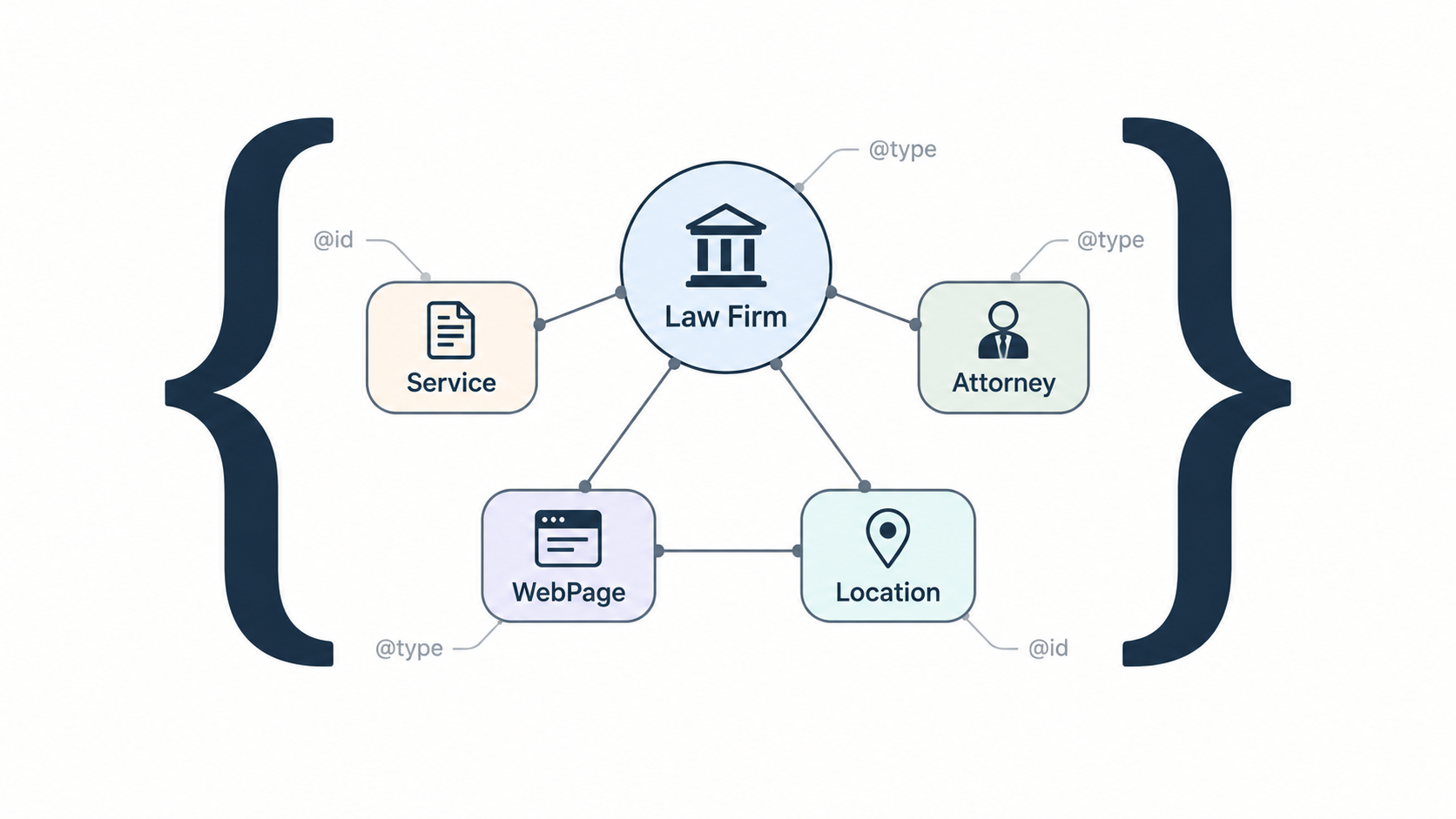
For a practice area page, we recommend thinking beyond individual schema tags. The goal is to identify the firm, the service described on the page, attorneys, and any relevant people or locations, then connect them where the website supports those relationships.
A practice area schema graph can include:
- Your law firm as a
LegalService
This is the foundation of the graph. Give the firm a consistent@idthat you can reuse across your website, along with its name and website. You can also connect the firm to its genuine office locations and useareaServedto describe where it provides legal services. - The specific practice as a
Service
If the page is about Business Litigation, for example, you can identify that specific legal service and useproviderto connect to connect it to the firm. UseareaServedfor the service only when the stated coverage is accurate. - The practice area page as a
WebPage
The webpage and the legal service it describes are different entities. UsemainEntityto connect theWebPageto theServicethat is the primary subject of the page.BreadcrumbListcan then show where the page belongs within your wider practice-area structure. - Relevant attorneys as
Personentities
If the page identifies the attorneys who handle the matter, the schema can reflect the same relationship. Each attorney bio page can then provide more detail about the lawyer’s work and connect them to the relevant practice areas.worksForcan identify the firm,workLocationcan identify an attorney’s office, andknowsAboutcan identify a relevant topic when the visible content supports it. - Your firm’s actual locations
You can describe a physical office as aPlacewith an accurate address and connect it to the firm or an attorney. This is separate fromareaServed: the office identifies where the firm is located, whileareaServeddescribes where the firm or a particular service is available. Our study of Google Maps ranking factors for law firms looks at the patterns among 19 firms that appeared in the local search results we measured.
Example: Schema.org Markup for a Law Firm Practice Area Page
Suppose Smith Law, a fictional law firm, has a dedicated Business Litigation page. Jane Smith works for the firm and handles those matters. The firm has an office in Newark, and provides the service throughout New Jersey.
The example below shows how its markup could connect those facts. The names, address, and URLs are placeholders:
- Smith Law is the
LegalService. - Business Litigation is the
Service, with Smith Law identified as itsproviderand New Jersey as itsareaServed. - The Business Litigation page is the
WebPage, with Business Litigation identified as itsmainEntity. - Jane Smith is a
Person. HerworksForproperty connects her to Smith Law, whileknowsAboutconnects her to Business Litigation when the page content supports that relationship. - The Newark office is a
Place. Smith Law is connected to that location, and Jane Smith can be connected to it throughworkLocation. - The breadcrumb markup shows where the Business Litigation page sits within the law firm’s website.
In machine-readable terms, the relationships look like this:
Smith Law → LegalService
Smith Law → location → Newark Office
Smith Law → areaServed → New Jersey
Smith Law → employee → Jane Smith

Business Litigation → Service
Business Litigation → provider → Smith Law
Business Litigation → areaServed → New Jersey
Business Litigation → mainEntityOfPage → Business Litigation Page

Business Litigation Page → WebPage
Business Litigation Page → mainEntity → Business Litigation
Business Litigation Page → breadcrumb → Practice Areas > Business Litigation

Jane Smith → Person
Jane Smith → worksFor → Smith Law
Jane Smith → knowsAbout → Business Litigation
Jane Smith → workLocation → Newark Office{
"@context": "https://schema.org",
"@graph": [
{
"@type": "LegalService",
"@id": "https://www.smithlaw.com/#lawfirm",
"name": "Smith Law",
"url": "https://www.smithlaw.com/",
"areaServed": {
"@type": "State",
"name": "New Jersey"
},
"location": {
"@id": "https://www.smithlaw.com/#newark-office"
},
"employee": {
"@id": "https://www.smithlaw.com/attorneys/jane-smith/#person"
}
},
{
"@type": "Place",
"@id": "https://www.smithlaw.com/#newark-office",
"name": "Smith Law Newark Office",
"address": {
"@type": "PostalAddress",
"streetAddress": "123 Market Street",
"addressLocality": "Newark",
"addressRegion": "NJ",
"postalCode": "07102",
"addressCountry": "US"
}
},
{
"@type": "Person",
"@id": "https://www.smithlaw.com/attorneys/jane-smith/#person",
"name": "Jane Smith",
"jobTitle": "Business Litigation Attorney",
"url": "https://www.smithlaw.com/attorneys/jane-smith/",
"worksFor": {
"@id": "https://www.smithlaw.com/#lawfirm"
},
"knowsAbout": {
"@id": "https://www.smithlaw.com/practice-areas/business-litigation/#service"
},
"workLocation": {
"@id": "https://www.smithlaw.com/#newark-office"
}
},
{
"@type": "Service",
"@id": "https://www.smithlaw.com/practice-areas/business-litigation/#service",
"name": "Business Litigation",
"serviceType": "Business Litigation",
"url": "https://www.smithlaw.com/practice-areas/business-litigation/",
"provider": {
"@id": "https://www.smithlaw.com/#lawfirm"
},
"areaServed": {
"@type": "State",
"name": "New Jersey"
},
"mainEntityOfPage": {
"@id": "https://www.smithlaw.com/practice-areas/business-litigation/#webpage"
}
},
{
"@type": "WebPage",
"@id": "https://www.smithlaw.com/practice-areas/business-litigation/#webpage",
"url": "https://www.smithlaw.com/practice-areas/business-litigation/",
"name": "Business Litigation Lawyers in New Jersey",
"mainEntity": {
"@id": "https://www.smithlaw.com/practice-areas/business-litigation/#service"
},
"breadcrumb": {
"@id": "https://www.smithlaw.com/practice-areas/business-litigation/#breadcrumb"
}
},
{
"@type": "BreadcrumbList",
"@id": "https://www.smithlaw.com/practice-areas/business-litigation/#breadcrumb",
"itemListElement": [
{
"@type": "ListItem",
"position": 1,
"name": "Home",
"item": "https://www.smithlaw.com/"
},
{
"@type": "ListItem",
"position": 2,
"name": "Practice Areas",
"item": "https://www.smithlaw.com/practice-areas/"
},
{
"@type": "ListItem",
"position": 3,
"name": "Business Litigation",
"item": "https://www.smithlaw.com/practice-areas/business-litigation/"
}
]
}
]
}@id gives other entities a consistent way to refer to it. The Service describes Business Litigation, and the WebPage identifies the page about that service. The attorney and office add details supported by the hypothetical site.How Should You Add Schema Markup to a Law Firm Website?
Have Your Developer Build Schema Into the CMS
For example, when your content writer creates a Business Litigation page, the CMS could generate the
WebPage and Service schema from the page itself. It could connect the service to the firm’s existing LegalService entity and pull in the attorneys or locations assigned to the page.The system should also let you override the automatically generated schema. Some pages will need more specific relationships than a standard template can produce. Giving your content or SEO team access to the custom schema makes it possible to adjust the markup without asking a developer to rewrite the template every time.
Use a Schema or SEO Plugin
If custom development is not practical, a schema plugin can make implementation much easier. Many plugins let you enter information about the law firm into structured fields and then generate schema markup for the appropriate pages automatically.
When choosing one, look beyond whether it supports LegalService or Person schema. Check whether you can edit the schema for an individual webpage and whether the plugin allows custom JSON-LD when its standard options are not specific enough.
That becomes especially useful on practice area pages. A plugin might automatically identify your firm as a LegalService, but you may still want to add Service markup for the particular practice and connect it to the attorneys who handle that work.
Here are a few options:
- Schema Engine AI: Generates schema automatically but also has a page-level Override option that suppresses the generated markup and lets you enter your own JSON-LD. That is particularly relevant to the workflow we are recommending.
- Rank Math PRO: Includes a Custom Schema Generator that lets you build schema for an individual page, save it for that page, or turn it into a reusable template.
- Schema Pro: Supports automatically applied schema as well as custom JSON-LD. Custom markup can be applied globally or entered for an individual page.
- All in One SEO Pro (AIOSEO): Lets you add custom JSON-LD to individual pages through its Schema Generator, validate it, and save custom schema as reusable templates.
- SEOPress PRO: Supports automatic and manual schema, including
Service,LocalBusiness, and custom JSON-LD.
Whichever method you use, check the final markup the published page actually outputs. Check for inaccurate properties, conflicting descriptions of the same entity, and relationships that the visible content does not support.
How Do You Test Schema Markup?
You are checking two different things. First, you want to know whether the schema itself is valid and uses Schema.org properties correctly. Then, once it is live, you want to confirm that search engines like Google can access the markup on the webpage and recognize any structured data they support.
Use the Schema Markup Validator to Check the Graph
Once the results appear, do more than check whether the validator reports an error. Check that properties belong to the intended entities and that
@id references connect them correctly. On a practice area page, for example, confirm that the Service points back to the correct LegalService provider and that the WebPage describes the intended service.Use Google’s Rich Results Test for Google Search Features
Do not assume your schema is broken simply because the Rich Results Test does not report every schema type in your graph. Schema.org includes many more types and properties than Google uses for rich-result features. Service, for example, can be valid Schema.org markup without being a standalone Google rich-result type. LegalService is a subtype of LocalBusiness, so Google may evaluate it in that context when the markup meets the requirements for Local Business structured data.
Test the Live URL After Publishing
Pay particular attention to schema generated automatically by your CMS, theme, or SEO plugin. You want to make sure it is not creating duplicate entities or conflicting with your custom markup.
Check the Published Page in Google Search Console
Inspect the URL in Google Search Console. If the page is new or has changed substantially, you can use URL Inspection to test the live page and request indexing. That request does not guarantee indexing, but it gives you a way to confirm that Google can access the version you have published.
After Google crawls the page, review any relevant structured data reports for errors or warnings. Keep in mind that Search Console does not report your entire Schema.org graph, so you should not expect LegalService or Service to appear simply because they are present in your graph.
When Google does report structured data, pay attention to the status:
- Error: Something in the markup needs attention and may prevent eligibility for the relevant Google search feature.
- Warning: Google has identified a non-critical issue, often involving a recommended property. Review it, but a warning does not automatically mean the schema is invalid.
- Valid: Google accepted the markup for the relevant structured data feature. This does not guarantee that a rich result will appear in search results page.
- Eligible for a rich result: The page meets the structured data requirements for that feature, but Google still decides whether to show the enhanced result for a particular search.
Repeat these checks when you change a schema template, switch plugins, or make a substantial change to the page’s content.
Want to Know What Your Law Firm Website Actually Needs?
If you are not sure where the gaps are, start with a law firm marketing audit from TypeTopia Agency. We will review your site’s technical foundation, including performance, crawlability, indexing, and structured data, along with the content on pages that matter most to prospective clients.
When the audit shows that work is needed, we can implement it for you. That could mean adding or cleaning up your schema markup, improving your practice area pages, or work on attorney bios, legal articles, and other law firm website content. If the existing site needs more than individual fixes, we can rebuild the website around the same SEO strategy, content, and technical foundation.
Click here to contact us, or email us directly at inquiries@typetopiaagency.com
Frequently Asked Questions About Schema Markup for Law Firms
Found this useful? See more from TypeTopia Agency in Google.
Add TypeTopia Agency as a preferred source to tell Google you’d like to see more of our law firm marketing research and guides.